 RE
REau
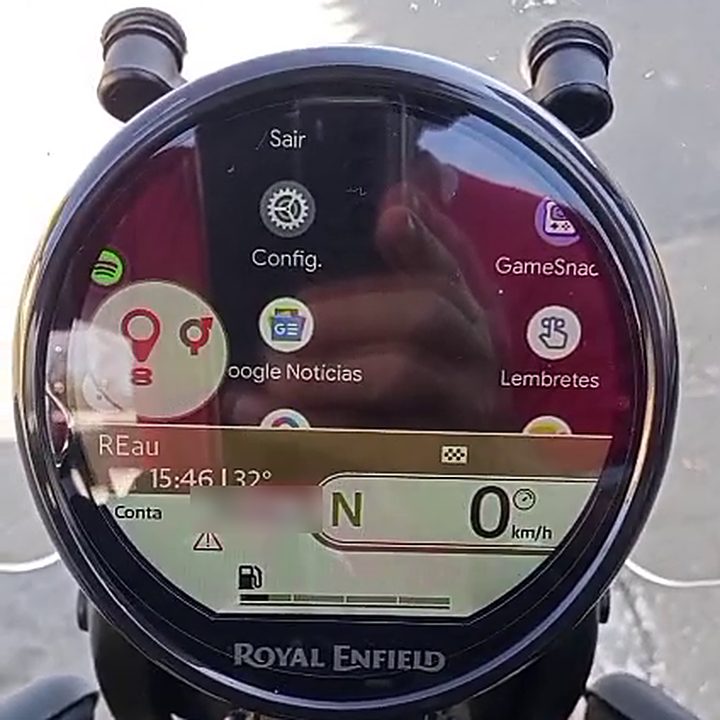
Bring the Android Auto of your own phone to the round TFT dash (Tripper Dash) of your Royal Enfield. No cable, no head unit, and with the phone screen off.
⚠️ Personal, independent project, still in testing. Every rider installs and uses it at their own risk. Touch the phone only while the motorcycle is stopped.
How it works
REau presents itself to Android Auto as a car’s head unit, inside your own phone, using the head unit server that Android Auto offers in developer mode. It receives the video, crops and scales the picture for the dash’s screen and sends it over the dash’s Wi-Fi. REau does not draw a map or calculate a route: it repeats on the dash what the navigation app draws.
What it does
- Shows Android Auto on the dash, with adjustable fit (navigation apps and the other screens).
- Sends the dash the maneuver, distance, arrival time and time left on the route.
- Also sends the song playing (with a music control on the joystick), calls and weather, for the dash’s cards.
- Uses the handlebar joystick to control Android Auto (map, menu, music, calls and Gemini).
- Draws a volume notice and a call notice on the dash’s video (answer and decline with the joystick) and writes the info ring’s weather in the dash’s title.
- Warns the rider through notifications in the “Dash alerts” channel (with sound and vibration) and, if you switch it on, by voice in the helmet headset, when the dash hangs or stops responding, another app has the dash, the phone’s Wi-Fi is off or the phone gets hot.
- Has a Tips page and, with its switch on, tells you once a day when there is a new version (it downloads nothing).
- Speaks Portuguese, English and Spanish, with a selector in Settings.
- Adjusts the video quality by the distance to the next maneuver and by speed, at the pace you choose: Original (the factory one, 4 and 2 fps) or REau (6 and 3 fps, smoother).
- Optional: shows Android Auto in a browser on the local network, protected by a PIN.
Several 0.3.0 novelties (the new joystick actions, the music mode with Spotify, “Driving side”, the notice of a new version, the notices for a dash that stopped responding and for another app on the connection, the rain in mm and the danger five turns in six) have not been tried on the bike yet; the FAQ says which.
One app
REau is a single app (com.reau.app). By default it opens Android Auto’s settings and you turn the head unit server on by hand (it turns off when the session ends, so you turn it on again every time). It tells which Android Auto screen is open from the picture itself, with a small neural network that runs on the phone. Details in section 2 of the FAQ.
Coming from the old REau Lite? REau 0.3.0 is a new app for you (the Lite had the package com.reau.app.lite): redo the settings and the pairing with the dash, then uninstall the old Lite. Coming from the earlier REau (com.reau.app)? Just install over it: settings and pairing stay. Two installations together compete for Android Auto’s single server.
Requirements
- Android 10 or newer phone, with Android Auto installed and up to date.
- Android Auto developer mode on, with the head unit server (the guide explains how).
- A compatible dash (Tripper Dash) with its Wi-Fi in range; compatibility verified with firmware 13.10.
Privacy
No account, no ads, no data collection. What leaves the phone goes to the dash; the only trips to the internet are the weather (on by default once you allow the location, with a switch to turn it off) and the update check (the “Check now” button and, once a day by itself, with a switch to turn it off), which asks GitHub only for the latest version number. See privacy and terms.
Free software
REau is free software under the GNU Affero General Public License v3.0. The source code, the changelog and the credits of the projects it uses are in the repository. Each APK published on the Releases page comes with its exact source code: the “Source code” items of the same Release (the tag of that version).